 Process Explorer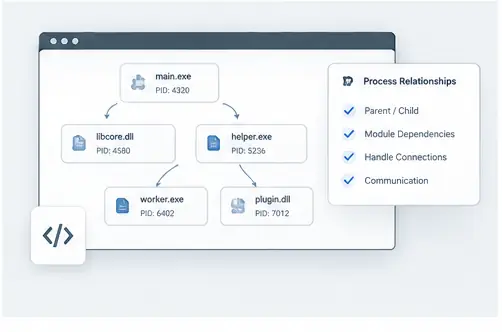
Follow the chain
Applications often depend on helper executables, libraries and background components. Process relationships make those dependencies visible. Start from the application you recognize and follow its parent and child relationships to understand the runtime structure.
Separate process and module relationships
A child process is a separate executable with its own process identity. A loaded DLL is a module inside the process. Keeping those two concepts separate helps you interpret what you are seeing and prevents an incorrect assumption that every visible component is another process.
Use relationships during debugging
When a developer reports that an application starts another executable, creates a worker process or loads a particular library, the process tree and module information provide a useful verification point. You can compare the expected structure with what is actually running.
Build a repeatable workflow
A good investigation can be simple: identify the visible application, trace its process relationships, inspect the relevant process properties, then follow the resource or module that explains the behavior. This keeps the analysis organized and makes findings easier to communicate.
Trace dependencies across the process landscape
Applications often rely on helper processes, services and loaded modules. Following those relationships can explain why a process exists and which components are connected to it. The process tree is the starting point, while properties, handles and modules add the detail needed for a fuller picture.
Practical checklist
Start at the visible application, trace its parent, expand child processes, inspect important modules, check relevant handles, and document the chain of relationships that explains the behavior you are investigating.